FEF UI Lifecycle
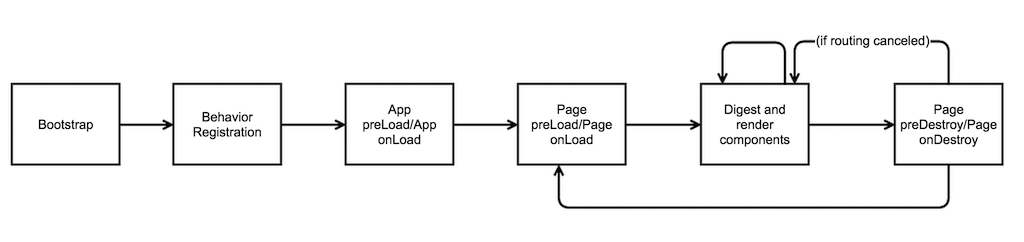
Bootstrap and Behavior Registration
- Bootstrap
- All FEF JavaScript and css files downloaded.
- Behavior definition JavaScript files downloaded but not yet executed.
- Order of downloading:
- The core FEF library files (scripts and stylesheets) are included.
- Derived flavors of FEF are included as additional scripts and stylesheets.
- App-defined JavaScript and css files (the "includes" section of the includes.json file).
- Behavior registration
- All three categories of includes - each define behavior registration functions
- App-defined behavior definition functions are those in the "behaviors" section of the includes.json file.
- Behaviors registration functions are executed in the order they were included.
- Behaviors are defined for "extensible objects".
- Components are one example of an extensible object.
- Every extensible object has a definition and a runtime.
- Definition is the set of behaviors applied to the extensible object.
- Runtime is an application instance of the extensible object.
- Some examples of behaviors that might be defined (not an all encompassing list below!):
- Component definitions (ie: Facade.Components.Docbar.setLabel(...)
- Strategy definitions
- Data Strategy
- Save Stratgy
- Buffering Strategy
- Function registrations
- Facade.FunctionRegistry.register("my.function.name", function(behaviorFn, args) { ... });
- Trigger registrations (will only run at specified timing in app lifecycle)
- Facade.Behaviors.App.onLoad(function(behaviorFn, args) { ... });
- Behaviors that are describing a non-function value such as a string or integer can be supplied statically or dynamically.
- Statically meaning passing the primitive value itself, ie: Facade.Behaviors.Section.forName("mySection").setLabelKey("mySectionLabel");
- Dynamically meaning passing a function that will calculate the primitive value: Facade.Behaviors.Section.forName("mySection").setLabelKey(function(behaviorFn, args) { return "mySectionLabel"; });
- Behaviors describing a function value should always be passed a function.
- Behavior definitions can be limited to a subsection of extensible objects using the following filters:
- forName - limits the definition to one instance of the extensible object with the given name (if multiple exist with that name, applies to the first one)
- forKind - limits the defintion to all extensible objects labeled with the given "kind".
- forPage - limits the definition to extensible objects only when we are on the given page
- forType - limits the definition to extensible objects only when the path is pointing to the given type
- forPath - limits the definition to extensible objects only when the path is pointing to the given type and path
- Runtimes are generated later in the lifecycle, but will be defined based on behaviors registered here and in the core code.
- The behaviors used by runtimes are based on, in order:
- Behaviors defined in the page template itself
- specificity (see filters)
- when it was defined (order in includes.json and in script itself)
- The behaviors used by runtimes are based on, in order:
- Begin App Load
App Load
- App triggers are run after behaviors have been registered.
- No pages will load or render until these triggers have completed running and have resolved any asynchronous calls (aka "promises").
-
"core.app.preLoad" Trigger
- Register a trigger on this event by calling Facade.Behaviors.App.preLoad(function(behaviorFn, args) { ... });
- Distinct from App onLoad, it is best used for:
- initiating fetches of remote data and designs that are used app-wide
- making later page/component renderings much faster due to server-side fetches already occurring
- The return value from each trigger may be a promise, which will cause the bootstrap to halt until it completes. For example...
// this will halt because it will wait for the return to complete
Facade.Behaviors.App.preLoad(function(){
 return Facade.Resolver.find("$AbcD1", "123");
});
// this will not halt - it will move on before the query completes
Facade.Behaviors.App.preLoad(function() {
   Facade.Resolver.find("$XyzD1", "789");
});
- "core.app.onLoad" Trigger
- This trigger is called only when all App preLoad triggers have completed and their promises have resolved.
- It is best used for:
- modifying data, designs, picklists, etc. that were fetched from the server in the preLoad step
- creating and registering client-side data, picklists, designs, etc that is used app-wide
- The return value from each trigger may be a promise, which will cause the UI to halt loading until it completes.
- May also initiate server-side fetches here, but it is recommended to do this in preLoad if possible.
- Localizations were fetched in the preLoad step so bundles are accessible starting at this step, if needed
- Once App onLoad has completed, determine the starting page via the "core.page.startingPage" function.
- Then load first page.
Page Load
- Page triggers are run after app has completed loading and the page has been set.
- Page will not render until these triggers have completed running and have resolved any asynchronous calls (aka "promises").
- "core.page.preLoad" Trigger
- Has the same role as App preLoad but on a page level.
- Uses "core.page.startingPage" function to determine starting page to load if no page is already loaded.
- Defaults to the pages.json entry with start=true.
- Distinct from Page onLoad, it is best used for:
- initiating fetches of remote data and designs that designer may not want to be done on app load, because:
- page is not frequently used
- page is not the starting page and do not want to delay app loading for these resources
- initiating fetches of remote data and designs that designer may not want to be done on app load, because:
- The return value from each trigger may be a promise, which will cause the UI loading to halt until it completes.
- "core.page.onLoad" Trigger
- Has the same role as App onLoad but on a page level.
- It is best used for:
- Modifying data, designs, picklists, etc. that were fetched from the server in the preLoad step.
- Creating and registering client-side data, designs, picklists, etc. that are only needed for this page.
- The return value from each trigger may be a promise, which will cause the UI loading to halt until it completes.
- Verification that primary data has been set to either actual Data or ResolvingData of the same type as that in the Page.
- If a page has no type, then it is an error for the primary data to have been set.
- Render page
Page Render and Digest
- Template compilation
- FEF parses the page's template.
- Component runtimes explicitly declared in the template are built.
- Each component has a render method which will render some DOM, as well as declare other components (which then call their render methods).
- Component runtimes are built with following attributes (among other more specific ones):
- Path-relative to the primary data currently in scope, if no other data is specified.
- Respecting the edit mode and mask currently in scope.
- If backing data is a ResolverData, some components have a temporary resolving state where there is an opportunity to represent a loading message. When data finishes loading component will render normally.
- Digest
- Component runtimes are regenerated on every digest loop.
- However, once the DOM is rendered, for performance reasons, only certain changes to the component runtime will register a re-render of the DOM for that component.
- Example of attribute that triggers re-render: if backing data of a field is changed independent of a user editing it directly, field should get re-rendered with corrected data.
- If we watched every component attribute for a change, that would slow down the digest loop tremendously, so we made the trade-off to favor performance over flexibility - we can continue to add watched attributes as they are needed, but it is harder to take them away if they are not needed.
- If page is changed, begin navigating away from current page.
Page Destroy
- Page navigation request (e.g. via Facade.PageRegistry.setCurrent)
- page preDestroy
- Allows for cancellation of the navigation event.
- The return value from each trigger may be a promise, which will cause the navigation to halt until it completes.
- page onDestroy
- Opportunity to perform final cleanup.
- The return value from each trigger may be a promise, which will cause the navigation to halt until it completes.
- FEF inspects the next page's type; if it differs from the previous page, the primary data is cleared.
- The new page is set.
- Page loading continues.
Concepts vs. Timings Matrix
| FEF Bootstrap / Behavior Registration | App preLoad | App onLoad | Page preLoad | Page onLoad | Page Render | Digest | Page preDestroy | Page onDestroy | |
|---|---|---|---|---|---|---|---|---|---|
| Designs | Fetch/register designs from the server needed for app, non-specific to a page. | Modify preloaded app designs if desired (ex. adding virtual fields), or register designs not on server. Opportunity to react to App preLoad discovery. |
Fetch/register designs from the server that are specific to a page. | Modify preloaded page-specific designs if desired (ex. adding virtual fields), or register designs not on server. Opportunity to react to Page preLoad discovery. |
|||||
| Data | Fetch/register data from the server needed for app, non-specific to a page. | Modify preloaded data, or register data client-side. Opportunity to react to App preLoad discovery. |
Fetch/register data from the server that are specific to a page. | Modify preloaded page-specific data, register data client-side. Set primary data for page, if page has an explicit primaryType. | May load server-side data at any time - it is recommended to use ResolverData | Clears primary data, if it exists | |||
| Picklists | Fetch/register picklists from the server needed for app, non-specific to a page. | Modify preloaded picklists, or register picklists client-side. Opportunity to react to App preLoad discovery. |
Fetch/register picklists from the server that are specific to a page. | Modify preloaded page-specific picklists, or register picklists clients-side | |||||
| Extensible Object or Component Definitions | Behavior declarations, via scripts and templates, are loaded and registered. | ||||||||
| Extensible Object or Component Runtimes | Begin generating runtimes needed for page | Recalculate on every digest | |||||||
| DOM Render | Renders every component runtime | Redraws only when certain attributes of component runtimes change | |||||||
| Navigation | Page Registry is loaded | Determine starting page and initiate route to it | Page set | Routing to another page has begun. Can cancel the routing or redirect it here | Page is unset | ||||
| Localization | Fetches global localization bundle, and platform module bundle from design (when applicable) | ||||||||
| Registered functions | Declared. Can be invoked anytime after declaration. |
Have Questions?
Have any questions? Ask a developer evangelist a question here. Your question will be forwarded directly to the Evangelism team at Infor Nexus and will be answered imminently. The answer to your question will be emailed to you, as well as possibly posted on the site as a reference for other AppXpress Developers.